Rest PKI - Configure Date and Time
You can change the date format and time zone used to compose dates on PDF signatures done with Rest PKI.
To alter this configuration, follow the steps below:
-
Sign in to https://pki.rest/
-
On the top menu, click your email and Account

-
On the next page, use the controls on the area Region and Date to configure the date appearance:

The following configurations are available:
- Culture
- Time Zone
- Date Format
For instance, the following configuration results in the date show below:
- Culture: Portuguese (Brazil)
- Time Zone: UTC
- Date Format: Complete with time zone
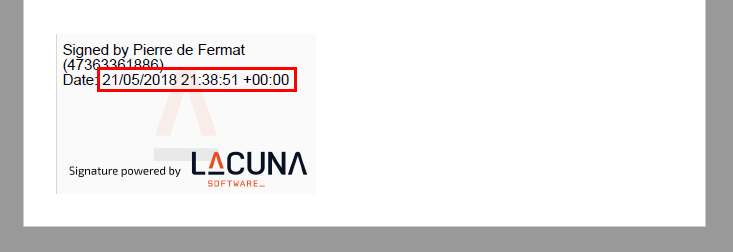
Another possible configuration would be:
- Culture: Portuguese (Brazil)
- Time Zone: (UTC-03:00) Brasilia
- Date Format: Short date and time
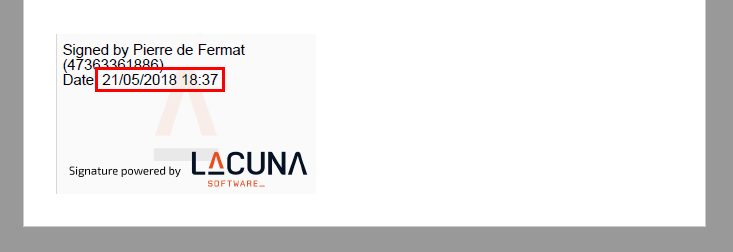
observação
Time is adjusted automatically for daylight saving time on time zones on which it applies.
Date formats
The supported date formats are:
| Date Format | Culture = English (United States) | Culture = Portuguese (Brazil) |
|---|---|---|
| Complete with time zone | 5/21/2018 7:48:51 PM -03:00 | 21/05/2018 19:48:51 -03:00 |
| Long date and time | Monday, May 21, 2018 7:48:51 PM | segunda-feira, 21 de maio de 2018 19:48:51 |
| Short date and time | 5/21/2018 7:48 PM | 21/05/2018 19:48 |
| Long date and short time | Monday, May 21, 2018 7:48 PM | segunda-feira, 21 de maio de 2018 19:48 |
| Short date and long time | 5/21/2018 7:48:51 PM | 21/05/2018 19:48:51 |